If you are building Windows Phones apps that require the use of GPS, you cannot use the Emulator, and should preferably be outside.
While building some of my latest WinPhone apps, I needed to be able to able test moving around on a map, while being able to debug. However I preferred doing this at the comfort of my desk. So I had to “fake” a GPS signal. Luckily the GeoCoordinateWatcher class that is used for this, implements the interface “IGeoPositionWatcher<GeoCoordinate>”. If I were to create my own class that implements this interface, I had an option for using a separate class for receiving data from the location service. I ended up needing two types of location simulators for my routing app: One that starts at a given location and direction, and randomizes speed and direction over time. The other follows a predefined route. You can download the source code for these below.
The next step is to automatically use the simulator when I’m running on the emulator, but use the “real” location service when running on the device. You can accomplish this by checking the DeviceName first. Example:
1: IGeoPositionWatcher<GeoCoordinate> geowatcher;
2: string deviceName = Microsoft.Phone.Info.DeviceExtendedProperties.GetValue("DeviceName").ToString();
3: if (deviceName == "XDeviceEmulator") //Use simulator for emulator
4: geowatcher = new GeoCoordinateSimulator(34.0568, -117.195, 270)
5: else
6: geowatcher = new GeoCoordinateWatcher(GeoPositionAccuracy.High);
7: geowatcher.PositionChanged += watcher_PositionChanged;
8: geowatcher.Start();
The above uses the “random” simulator when running on the emulator.
The other simulator takes a set of GeoCoordinates and interpolates between them at the specified speed. Example:
1: var pnts = new List<GeoCoordinate>();
2: pnts.Add(new GeoCoordinate() { Longitude = -117.195670639, Latitude = 34.0568044102 });
3: pnts.Add(new GeoCoordinate() { Longitude = -117.195697272, Latitude = 34.0585127272 });
4: pnts.Add(new GeoCoordinate() { Longitude = -117.204302784, Latitude = 34.0515719501 });
5: geowatcher = new SharpGIS.WinPhone.Gps.GpsDriveSimulator(pnts, 20);
Below is an example of this simulator in action on the emulator in a little app I’m working on:
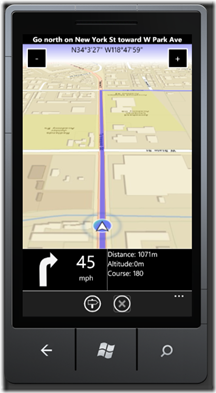
![photo[1]](/image.axd?picture=photo%5B1%5D_thumb.jpg "photo[1]")
It was fun putting this app on the real device, go for a drive along roughly the same route and it worked exactly same. The simulator helped me weed out a series of bugs that would have taken me several (dangerous) “test drives” if I hadn’t had this simulator.
Download Simulator code here: